
Using More Than One Organisation
You can belong to more than one organisation, for example your own and a client’s, and Vismo asks which one you mean whenever it matters. See What is an Organisation?.
Where Vismo asks which organisation
Opening your organisation’s pages
Click Organisation in the left-hand menu on the Home page. Vismo shows Choose an organisation: pick one from the Organisation list. You land on that organisation’s own People, Billing & Usage and Settings. See Change Organisation Settings and Monitor Your Organisation’s Usage. To look at another organisation, go back to Home and choose Organisation again.
Creating a project
On Create Project, choose the Organisation the project will belong to. You have to pick one to continue, and what you can do depends on your role there. You might be an Admin in one organisation and only a Viewer in another. See Create a Project.
Browsing projects
My Projects lists the projects you’re a member of, whichever organisation they belong to. Click Filter & sort and choose one or more organisations from the Organisation filter, or group the list By Organisation.
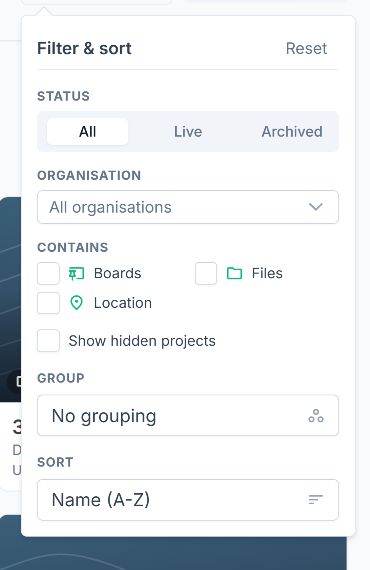
To find projects you haven’t joined, click Browse to open Available Projects, then choose an organisation from the Organisation list at the top. See Find and Join Projects.
Copying and transferring projects
When you copy a project, Copy into lists the organisations where you’re an Admin or a Member. See Copy Projects. When you accept a transferred project, Transfer into lists your Admin or Member organisations other than its current one. See Transfer Project.
Setting up a subscription
Vismo asks “Which one is this subscription for?” and only offers organisations where you’re an Admin.
Good to know
- Vismo has no single switch that changes your whole account from one organisation to another.
- If you belong to only one organisation, you’ll never see these questions.
- The organisation is part of the page address on organisation pages, so a bookmark opens the organisation you saved it from.
- A project belongs to one organisation. Open it from My Projects, a link or an invitation without choosing an organisation first.
- Your project roles are separate from your organisation roles. See Project User Roles & File/Folder Permissions.
- On your phone, New project and Browse organisation projects both have an Organisation list. See Vismo on Your Phone.