
Report a Problem
If something in Vismo isn’t working the way it should, tell us. You can send a report from inside the app, with screenshots, or email our support team.
Report a bug in the web app
Step 1: Open the dialog
At the bottom of the left-hand menu, click Report a bug.
Step 2: Describe the problem
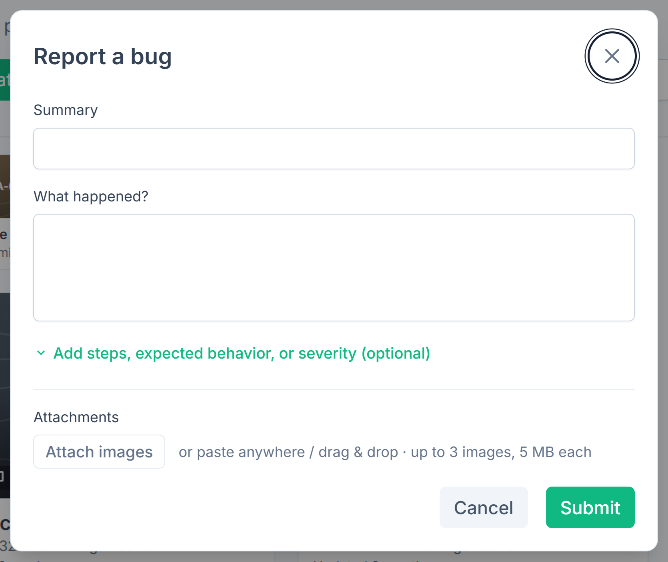
Enter a Summary in a few words. Under What happened?, describe what you did and what went wrong.
Step 3: Add detail (optional)
Click Add steps, expected behavior, or severity (optional) to add the steps to reproduce (such as "1. Open a project. 2. Click Upload Files. 3. See the error."), what you expected to happen, and a Severity of Low, Medium or High. It starts as Medium.
Step 4: Attach screenshots and submit
Click Attach images, or paste or drag an image into the window. Then click Submit. Vismo shows a reference number for your report, and our team investigates.
Report a bug in the mobile app
Tap the bug icon at the top of the screen and describe what went wrong. Tap Copy report, which copies your description with the build, page, your email address and device details. Paste it into an email to support@vismo.io, because the mobile app doesn’t send the report itself.
Email support
You can always email support@vismo.io. It helps to include:
- what you were trying to do and what happened instead
- the project or file involved, and the page you were on
- your browser and device, and whether it happens every time
- a screenshot of anything that looks wrong
Good to know
- You can attach up to three images of up to 5 MB each, as PNG, JPEG or WEBP. If they can’t be attached, Vismo still sends your report and tells you.
- Vismo includes your email address so we can follow up, the page address without any extra details after it, and your browser and device details, window size and Vismo version.
- You can send up to five reports an hour. If you go over, Vismo asks you to try again later.
For help getting into Vismo, see Having Trouble Accessing Vismo.