
Having Trouble Accessing a Project?
If you’ve received an email inviting you to a project but can’t see it, there are a few things to check:
1. Check for pending invites
Look for a banner under Home -> Projects indicating any pending invites. You can also view pending invites from the notifications panel (bell icon) in the top right corner.
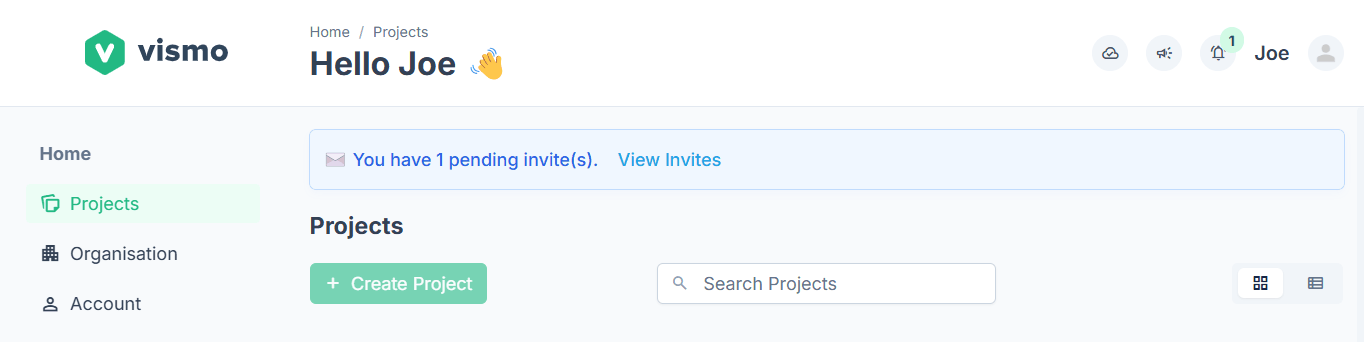
2. Check your email
Ensure you’ve signed up for Vismo with the same email address used for the invite. If not, you’ll need to:
- Create an account with the email address you were invited with, or
- Ask the inviter to resend the invite to the email address you used to sign up.
3. Check the invite went to your address
If you see “The invite link you used does not match your email address” on Home, or a page headed Use The Invited Email, you signed in with a different address from the one that was invited. Sign in with the invited address, or choose Try again with another email. Or ask the inviter to invite the address you signed in with.
4. Check whether you’ve joined it
My Projects only lists projects you’re a member of. A project that’s open to your organisation, or invite only, sits under Available Projects until you join or request access. Open the Available Projects tab (or click Browse in the line above your projects), find the project and choose Join as Member or Request Access. If you belong to more than one organisation, pick the right one from the Organisation list at the top. See Find and Join Projects.
5. Check your filters
My Projects remembers your Filter & sort choices, so an old filter can hide a project. Open Filter & sort and clear the Status, Your role and Contains choices. If your projects come from two or more organisations, there is also an Organisation filter that starts on All organisations, so make sure it isn’t narrowed to one. Tick Show hidden projects in case you hid it earlier.
6. Stuck on “Choose your organisation”?
You don’t need an organisation to open a project you were invited to. Choose Skip for now and look in My Projects.
7. Can see the project but not the files?
You may have the Limited role, which only shows the folders shared with you. Ask a project Admin to share more folders. See Project User Roles & File/Folder Permissions.
Still stuck? See Having Trouble Accessing Vismo? for missing emails, and what to send support.